C# Transparent Label
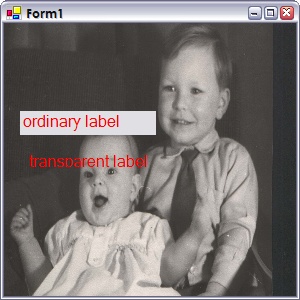
The WinForms label isn't very good when it comes to transparency, this one is better. Saying that, in some scenarios it may not repaint itself. It also doesn't support all the properties provided by the Label control, so your mileage may vary. If there's anything missing that you need, let me know and I'll try to add it in.
One problem you may come across is that if you change the image behind the label, the label might disappear. This can be resolved by calling the Refresh() method of the label after changing the image.
using System;
using System.Drawing;
using System.Windows.Forms;

namespace WinFormsControls
{
  /// <summary>
  /// A label that can be transparent.
  /// </summary>
  public class TransparentLabel : Control
  {
    /// <summary>
    /// Creates a new <see cref="TransparentLabel"/> instance.
    /// </summary>
    public TransparentLabel()
    {
      TabStop = false;
    }

    /// <summary>
    /// Gets the creation parameters.
    /// </summary>
    protected override CreateParams CreateParams
    {
      get
      {
        CreateParams cp = base.CreateParams;
        cp.ExStyle |= 0x20;
        return cp;
      }
    }

    /// <summary>
    /// Paints the background.
    /// </summary>
    /// <param name="e">E.</param>
    protected override void OnPaintBackground(PaintEventArgs e)
    {
      // do nothing
    }

    /// <summary>
    /// Paints the control.
    /// </summary>
    /// <param name="e">E.</param>
    protected override void OnPaint(PaintEventArgs e)
    {
      DrawText();
    }

    protected override void WndProc(ref Message m)
    {
      base.WndProc(ref m);
      if (m.Msg == 0x000F)
      {
        DrawText();
      }
    }

    private void DrawText()
    {
      using (Graphics graphics = CreateGraphics())
      using (SolidBrush brush = new SolidBrush(ForeColor))
      {
        SizeF size = graphics.MeasureString(Text, Font);

        // first figure out the top
        float top = 0;
        switch (textAlign)
        {
          case ContentAlignment.MiddleLeft:
          case ContentAlignment.MiddleCenter:
          case ContentAlignment.MiddleRight:
            top = (Height - size.Height) / 2;
            break;
          case ContentAlignment.BottomLeft:
          case ContentAlignment.BottomCenter:
          case ContentAlignment.BottomRight:
            top = Height - size.Height;
            break;
        }

        float left = -1;
        switch (textAlign)
        {
          case ContentAlignment.TopLeft:
          case ContentAlignment.MiddleLeft:
          case ContentAlignment.BottomLeft:
            if (RightToLeft == RightToLeft.Yes)
              left = Width - size.Width;
            else
              left = -1;
            break;
          case ContentAlignment.TopCenter:
          case ContentAlignment.MiddleCenter:
          case ContentAlignment.BottomCenter:
            left = (Width - size.Width) / 2;
            break;
          case ContentAlignment.TopRight:
          case ContentAlignment.MiddleRight:
          case ContentAlignment.BottomRight:
            if (RightToLeft == RightToLeft.Yes)
              left = -1;
            else
              left = Width - size.Width;
            break;
        }
        graphics.DrawString(Text, Font, brush, left, top);
      }
    }

    /// <summary>
    /// Gets or sets the text associated with this control.
    /// </summary>
    /// <returns>
    /// The text associated with this control.
    /// </returns>
    public override string Text
    {
      get
      {
        return base.Text;
      }
      set
      {
        base.Text = value;
        RecreateHandle();
      }
    }

    /// <summary>
    /// Gets or sets a value indicating whether control's elements are aligned to support locales using right-to-left fonts.
    /// </summary>
    /// <value></value>
    /// <returns>
    /// One of the <see cref="T:System.Windows.Forms.RightToLeft"/> values. The default is <see cref="F:System.Windows.Forms.RightToLeft.Inherit"/>.
    /// </returns>
    /// <exception cref="T:System.ComponentModel.InvalidEnumArgumentException">
    /// The assigned value is not one of the <see cref="T:System.Windows.Forms.RightToLeft"/> values.
    /// </exception>
    public override RightToLeft RightToLeft
    {
      get
      {
        return base.RightToLeft;
      }
      set
      {
        base.RightToLeft = value;
        RecreateHandle();
      }
    }

    /// <summary>
    /// Gets or sets the font of the text displayed by the control.
    /// </summary>
    /// <value></value>
    /// <returns>
    /// The <see cref="T:System.Drawing.Font"/> to apply to the text displayed by the control. The default is the value of the <see cref="P:System.Windows.Forms.Control.DefaultFont"/> property.
    /// </returns>
    public override Font Font
    {
      get
      {
        return base.Font;
      }
      set
      {
        base.Font = value;
        RecreateHandle();
      }
    }

    private ContentAlignment textAlign = ContentAlignment.TopLeft;
    /// <summary>
    /// Gets or sets the text alignment.
    /// </summary>
    public ContentAlignment TextAlign
    {
      get { return textAlign; }
      set
      {
        textAlign = value;
        RecreateHandle();
      }
    }
  }
}